

Introduction
If you have ever searched online for “how website is created”, you are not alone. In 2026, almost every business, creator, and organization depends on a website — yet very few people truly understand how the full creation process works from concept to launch.
A modern website is not just a collection of pages. It is a structured digital system combining design, development, performance optimization, content, security, data collection, and user experience engineering. Whether you are launching your first blog, opening an online store, building a SaaS product, or expanding a brand online, understanding how a website is created gives you control over your investment and your results.
This guide breaks the entire website creation process into clear, beginner-friendly steps. You will learn what website designers, front-end developers, Wix designers, and web scrapers actually do, when each role makes sense, what services are included, how much they cost, and where to hire trusted professionals in 2026.
By the end, you will understand exactly how your website should be planned, built, optimized, and maintained — and how to avoid the most common mistakes that cost businesses thousands of dollars.
Step 1: Planning — The Foundation of How a Website Is Created
Before any code or design begins, successful websites start with strategic planning.
Key planning questions:
- Who is the target audience?
- What problem does the website solve?
- What actions should visitors take?
- What pages are required?
- What data will be collected?
Without this planning stage, websites often fail — not because of bad design, but because of unclear purpose.
This phase typically involves collaboration between the business owner, website designer, and sometimes a marketing strategist.
What Does a Website Designer Do and How Can They Help Me?
A website designer creates the visual experience and user journey of your site.
They are responsible for:
- Layout structure
- Color systems
- Typography
- Branding alignment
- Navigation logic
- User experience (UX)
- Mobile responsiveness
A strong website designer improves your project by:
- Increasing conversion rates
- Making your brand credible
- Reducing user friction
- Guiding visitors toward business goals
If your website looks unprofessional, users will leave — even if your product is excellent.
You can explore professional Website designer services on Fiverr here:
https://www.fiverr.com/hire/website-design
What’s Included in Website Designer Services?
Website designer services normally include:
- UI/UX design
- Wireframes & prototypes
- Branding consistency
- Responsive layouts
- Homepage & page designs
- Conversion optimization
- Collaboration with developers
In the pricing section:
“For comparison, website designer services on Fiverr typically start around $X and can go up to $Y depending on project scope and experience level.”
Step 2: Choosing the Right Platform
Your platform depends on business goals.
| Platform | Best For |
|---|---|
| WordPress | Content & business sites |
| Shopify | Ecommerce |
| Webflow | High-design sites |
| Wix | Fast no-code sites |
| Custom stack | SaaS, complex systems |
This decision impacts cost, scalability, performance, and long-term growth.
What Does a Wix Website Designer Do and How Can They Help Me?
A Wix website designer specializes in building professional websites on the Wix platform.
They help you by:
- Structuring site content
- Creating responsive designs
- Implementing Wix features
- Setting up ecommerce, bookings, blogs
- Optimizing performance
They are ideal for:
- Small businesses
- Startups
- Personal brands
- Service providers
Hire experienced Wix professionals here:
https://www.fiverr.com/hire/wix-website-design
What’s Included in Wix Website Designer Services?
- Custom Wix layouts
- Page structure setup
- Mobile optimization
- App integrations
- SEO basics
- Speed improvements
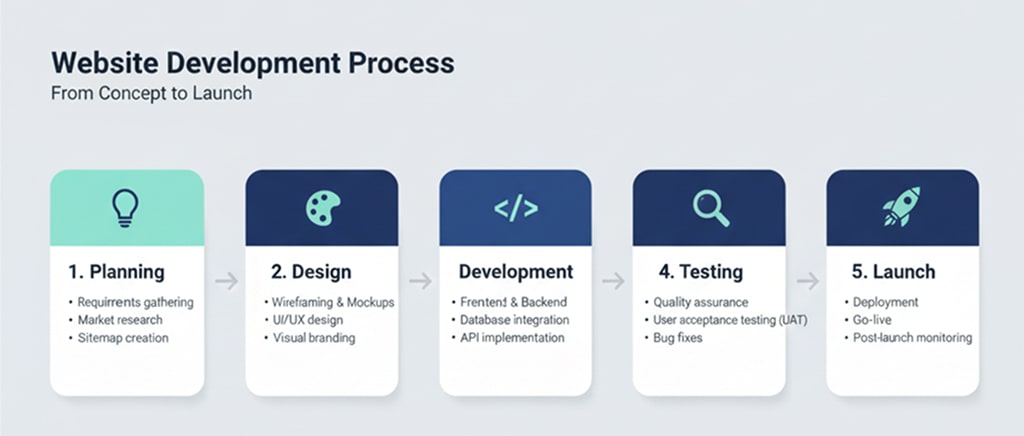
Step 3: Front-End Development — Bringing Design to Life
Once designs are ready, front-end developers convert them into live code.
What’s Included in Front-End Web Developer Services?
Front-end developers handle:
- HTML structure
- CSS styling
- JavaScript interactions
- Animations & transitions
- Responsive behavior
- Performance optimization
- Browser compatibility
They ensure the site works perfectly on all devices.
Find professional developers here:
https://www.fiverr.com/hire/frontend-web-development
Step 4: Data & Automation Integration
Modern websites often need dynamic data.
What Does a Web Scraper Do and How Can They Help Me?
A web scraper extracts data from external websites automatically.
They help by:
- Collecting product data
- Monitoring competitors
- Gathering pricing info
- Feeding databases
- Automating research
Hire trusted web scraping professionals:
https://www.fiverr.com/hire/web-scraping
What’s Included in Web Scraper Services?
- Custom scraping scripts
- Data extraction & cleaning
- Automation setup
- Scheduling updates
- API delivery
- Data storage
Step 5: Development & Backend Systems
Back-end developers handle:
- Databases
- User accounts
- Security
- APIs
- Payment systems
- Hosting configuration
Full-stack teams often manage both front-end and back-end.
You can explore complete website development teams here:
https://www.fiverr.com/hire/web-development

Comparing the Roles & When Each Makes Sense
| Role | When You Need Them |
|---|---|
| Website Designer | Branding & UX |
| Front-End Developer | Interactive UI |
| Wix Designer | Fast no-code builds |
| Web Scraper | Data automation |
| Back-End Developer | Systems & security |
Understanding these roles prevents hiring mistakes.
Common Questions About How Website Is Created
How long does it take?
2–12 weeks depending on complexity.
How much does it cost?
From a few hundred dollars to tens of thousands.
Do I need all roles?
Not always — but skipping critical roles limits results.
Practical Guidance: Step-by-Step Website Creation Checklist
- Define goals
- Choose platform
- Hire designer
- Build front-end
- Add backend & automation
- Test thoroughly
- Launch & monitor
- Improve continuously
Conclusion
Understanding how website is created empowers you to build better digital products. With the right designers, developers, and automation specialists, your website becomes a powerful business engine — not just an online brochure.
By choosing the correct roles at the right time and working with proven professionals, you protect your budget, timeline, and long-term success.